
ASUS ROG MAXIMUS Z890 APEX ATX主機板

 999紅利)
 加購選項
加購選項
產品特點
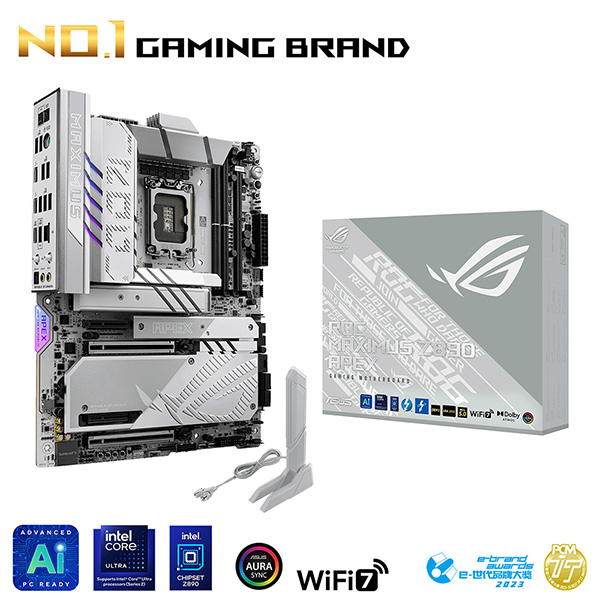
ROG Maximus Z890APEX
The ROG Maximus Z890 Apex fully supports Intel® Core™ Ultra processors (Series 2). Precision-engineered for supreme overclocking, it carries the legacy of the series forward into a new generation. With exceptional power delivery and a two-slot DDR5 memory layout, overclockers can meet and exceed their ambitions for record-breaking CPU and memory performance. For those who favor lighter colors for the aesthetics of their build, the ROG Maximus Z890 Apex features a cobble-gray surface, polished metallic accents, sleek contours and a predominantly silver palette.
- Teamed Power Solution
- Overclocking
- Effortless performance boost
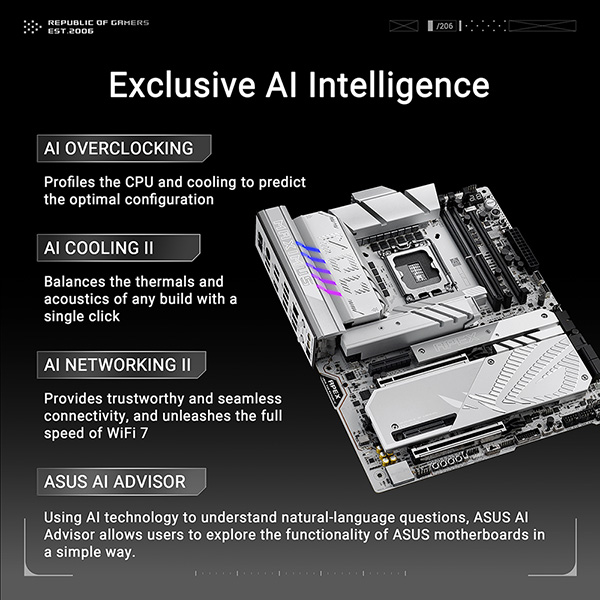
- AI Cooling II
- One-click fan tuning
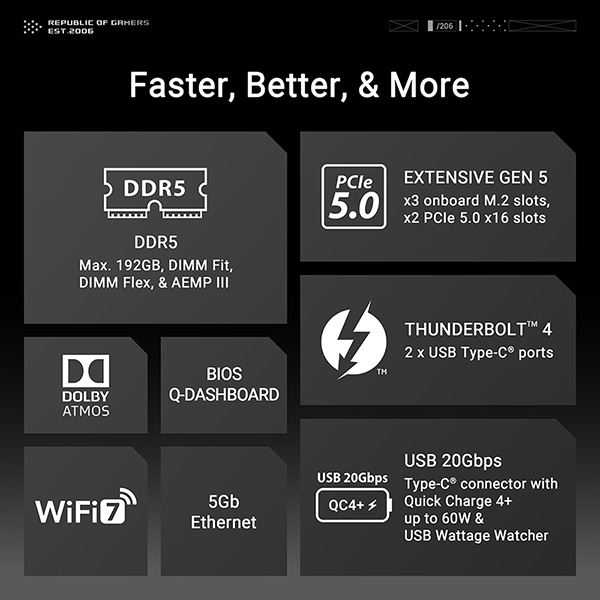
- DDR5 Max. 96 GB, DIMM Fit, DIMM Flex and AEMP III
- Extensive Gen 5x3 onboard M.2 slots, and x2 PCIe 5.0 x16 slots
產品規格
CPU
Support Intel® Core™ Ultra Processors(Series 2) , LGA1851
Supports Intel® Turbo Boost Technology 2.0 and Intel® Turbo Boost Max Technology 3.0**
* Refer to https://www.asus.com/support/download-center/ for CPU support list.
** Intel® Turbo Boost Max Technology 3.0 support depends on the CPU types.
晶片組
Intel® Z890 Chipset
記憶體
2 x DIMM slots, max. 96GB, DDR5
Supports up to 9600+ MT/s (OC), Non-ECC, Un-buffered ,Clocked Unbuffered DIMM (CUDIMM)*
Dual Channel Memory Architecture
DIMM Fit
Supports Intel® Extreme Memory Profile (XMP) memory module
Supports DIMM Flex
ASUS Enhanced Memory Profile III (AEMP III)
* Supported memory types, data rate (speed), and number of DRAM modules vary depending on the CPU and memory configuration, for more information please refer to CPU/Memory Support list under the Support tab of product information site or visit https://www.asus.com/support/download-center/. Adjustments will be made based on the specifications of mass-produced memory products available on the market.
* Non-ECC, un-buffered DDR5 memory supports On-Die ECC function.
顯示晶片
2 x Intel® Thunderbolt™ 4 ports (USB Type-C®) support DisplayPort and Thunderbolt™ video outputs****
* Graphics specifications may vary between CPU types. Please refer to www.intel.com for any updates.
**In Thunderbolt4TM mode, supports up to 8K@60Hz x1 with DSC or 4K@60Hz x 2, maximum total bandwidth up to 23.8Gbps or 16Gbps/16Gbps, for resolution support please check DisplayPort 2.1 specs.
***In DP alt mode, Only one USB Type-C® port supports up to UHBR20 at a time.
**** VGA resolution support depends on processors' or graphic cards' resolution.
*****While installing the operating system, please ensure that your monitor is connected to a discrete graphics card.
擴充槽
Support Intel® Core™ Ultra Processors(Series 2) *
2 x PCIe 5.0 x16 slots (supports x16 or x8/x8 or x8/x4/x4 modes)**
Intel® Z890 Chipset
2 x PCIe 4.0 x4 slots
* Please check the PCIe bifurcation table on the support site (https://www.asus.com/support/FAQ/1037507/).
** M.2_3 & M.2_4 share bandwidth with PCIEX16(G5)_2. When M.2_3 is enabled, PCIEX16(G5)_1 will run x8 & PCIEX16(G5)_2 will run x4. When M.2_3 & M.2_4 are enabled, PCIEX16(G5)_1 will run x8 & PCIEX16(G5)_2 will disabled.
- To ensure compatibility of the device installed, please refer to https://www.asus.com/support/download-center/ for the list of supported peripherals.
資料儲存應用
Total supports 6 x M.2 slots and 4 x SATA 6Gb/s ports*
Support Intel® Core™ Ultra Processors(Series 2) *
M.2_1 slot (Key M), type 2242/2260/2280/22110 (supports PCIe 5.0 x4 mode)
M.2_2 slot (Key M), type 2242/2260/2280 (supports PCIe 4.0 x4 mode)
M.2_3 slot (Key M), type 2242/2260/2280 (supports PCIe 5.0 x4 modes)**
M.2_4 slot (Key M), type 2242/2260/2280 (supports PCIe 5.0 x4 modes)**
Intel® Z890 Chipset
DIMM.2_1 slot (Key M) via ROG DIMM.2, type 2230/2242/2260/2280/22110 (supports PCIe 4.0 x4 mode)
DIMM.2_2 slot (Key M) via ROG DIMM.2, type 2230/2242/2260/2280/22110 (supports PCIe 4.0 x4 mode)
4 x SATA 6Gb/s ports
* Intel® Rapid Storage Technology supports PCIe RAID 0/1/5/10, SATA RAID 0/1/5/10, M.2 slot from CPU only supports RAID 0/1/5.
**M.2_3 & M.2_4 share bandwidth with PCIEX16(G5)_2. When M.2_3 is enabled, PCIEX16(G5)_1 will run x8 & PCIEX16(G5)_2 will run x4. When M.2_3 & M.2_4 are enabled, PCIEX16(G5)_1 will run x8 & PCIEX16(G5)_2 will disabled.
區域網路
1 x Realtek 5Gb Ethernet
ASUS LANGuard
Wireless & Bluetooth
Wi-Fi 7*
2x2 Wi-Fi 7 (802.11be)
Supports 2.4/5/6GHz frequency band**
Supports Wi-Fi 7 320MHz bandwidth, up to 5.8Gbps transfer rate.
Bluetooth® v5.4***
*Wi-Fi features may vary depending on the operating system
For Windows 11, Wi-Fi 7 will require 24H2 or later version for full functions, Windows 11 21H2/22H2/23H2 only supports Wi-Fi 6E.
For Windows 10, only Wi-Fi 6 is supported.
** Wi-Fi 6GHz frequency band and bandwidth regulatory may vary between countries.
*** The Bluetooth® version may vary, please refer to the Wi-Fi module manufacturer's website for the latest specifications.
USB連接埠
Rear USB (Total 11 ports)
2 x Thunderbolt™ 4 ports (2 x USB Type-C®)
1 x USB 20Gbps port (1 x USB Type-C®)
4 x USB 10Gbps ports (4 x Type-A)
4 x USB 5Gbps ports (4 x Type-A)
Front USB (Total 10 ports)
1 x USB 20Gbps connector (supports USB Type-C® with up to 60W PD/QC4+)*
1 x USB 10Gbps connector (supports USB Type-C®)
2 x USB 5Gbps headers support 4 additional USB 5Gbps ports
2 x USB 2.0 headers support 4 additional USB 2.0 ports
USB Type-C® power delivery output: max. 5V/3A
*USB Type-C® power delivery output: 5/9/15/20V max. 3A, PPS:3.3–21V max. 3A
音效
"ROG SupremeFX 7.1 Surround Sound High Definition Audio CODEC ALC4080*
- Impedance sense for front and rear headphone outputs
- Supports: Jack-detection, Multi-streaming, Front Panel MIC Jack-retasking
- High quality 120 dB SNR stereo playback output and 110 dB SNR recording input
- Supports up to 32-Bit/384 kHz playback on front panel"
Audio Features
- SupremeFX Shielding Technology
- Savitech SV3H712 AMP
- Gold-plated audio jacks
- Rear optical S/PDIF out port
- Premium audio capacitors
- Audio cover
* A chassis with an HD audio module in the front panel is required to support 7.1 Surround Sound audio output.
** The LINE OUT port on the rear panel does not support spatial audio. If you wish to use spatial audio, make sure to connect your audio output device to the audio jack on the front panel of your chassis or use a USB interface audio device.
後面板輸出端子
2 x Thunderbolt™ 4 ports (USB Type-C®)
1 x USB 20Gbps port (1 x USB Type-C®)
4 x USB 10Gbps ports (4 x Type-A)
4 x USB 5Gbps ports (4 x Type-A)
1 x Wi-Fi Module
1 x Realtek 5Gb Ethernet port
2 x Gold-plated audio jacks
1 x Optical S/PDIF out port
1 x BIOS FlashBack™ button
1 x Clear CMOS button
1 x PS/2 keyboard/mouse combo port
內建 I/O 連接孔
Fan and Cooling related
1 x 4-pin CPU Fan header
1 x 4-pin CPU OPT Fan header
1 x 4-pin AIO Pump header
2 x 4-pin Chassis Fan headers
2 x 4-pin Full Speed Fan headers
1 x W_PUMP+ header
1 x Extra Flow Fan header
Power related
1 x 24-pin Main Power connector
2 x 8-pin +12V Power connector
1 x 8-pin PCIe Power connector
Storage related
4 x M.2 slots (Key M)
1 x DIMM.2 slot supports 2 x M.2 slots (Key M)
4 x SATA 6Gb/s ports
USB
1 x USB 20Gbps connector (supports USB Type-C®)
1 x USB 10Gbps connector (supports USB Type-C®)
2 x USB 5Gbps headers support 4 additional USB 5Gbps ports
2 x USB 2.0 headers support 4 additional USB 2.0 ports
Miscellaneous
1 x 80 Light Bar jumper
3 x Addressable Gen 2 headers
1 x Alteration PCIe mode switch
4 x BCLK button
1 x BIOS Switch button
1 x FlexKey button
1 x Front Panel Audio header (F_AUDIO)
1 x LN2 Mode jumper
1 x Pause switch
18 x ProbeIt Measurement Points
1 x ReTry button
2 x RSVD switches
1 x RSVD header
1 x Safe Boot button
1 x Slow Mode switch
1 x Start button
1 x 10⁻¹ pin System Panel header
1 x Thermal Sensor header
1 x Thunderbolt™ (USB4®) header*
*The Thunderbolt™ card can only be used when installed to the PCIEX4(G4)_2 slot.
Ensure to install your Thunderbolt™ card to the PCIEX4(G4)_2 slot.
Special Features
Extreme OC Kit
- FlexKey button
- LN2 Mode
- ProbeIt
- ReTry button
- Safe boot button
- Start button
- Slow Mode
Extreme Engine Digi+
- SMD Capacitor
- MicroFine Alloy Choke
ASUS Q-Design
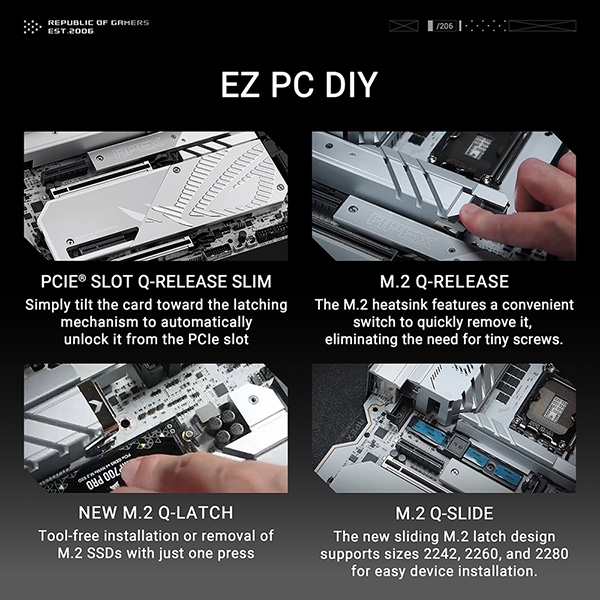
- M.2 Q-Latch
- M.2 Q-Release
- M.2 Q-Slide
- PCIe Slot Q-Release Slim (with PCIe SafeSlot)
- Q-Antenna
- Q-Code
- Q-Dashboard
- Q-Connector
- Q-DIMM
- Q-LED (CPU [red], DRAM [yellow], VGA [white], Boot Device [yellow green])
- Q-Slot
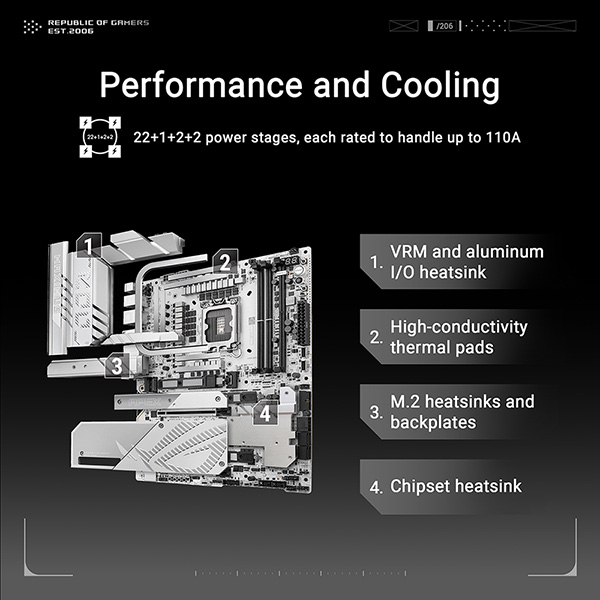
ASUS Thermal Solution
- M.2 heatsink backplate
- M.2 heatsink
- VRM heatsink design
ASUS EZ DIY
- BIOS FlashBack™ button
- Clear CMOS button
- CPU Socket lever protector
- ProCool II
- Pre-mounted I/O shield
- SafeSlot
- SafeDIMM
Aura Sync
- Addressable Gen 2 headers
Dual BIOS
Front Panel USB 20Gbps with Quick Charge 4+ Support
- Support: up to 60W fast charging and USB Wattage Watcher*
- Output: 5/9/15/20V max. 3A, PPS:3.3–21V max. 3A
- Compatible with PD3.0 and PPS
* To support 60W, please install the power cable to the 8-pin PCIe power connector or else only 27W will be supported.
軟體功能
ROG Exclusive Software
- ROG CPU-Z
- Dolby Atmos
- Internet Security (1-year full version)
ASUS Exclusive Software
Armoury Crate
- AIDA64 Extreme (1 year full version)
- Aura Creator
- Aura Sync
- Fan Xpert 4 (with AI Cooling II)
- GameFirst
- Power Saving
- HWiNFO
ASUS AI Advisor
ASUS Driver Hub
ASUS GlideX
Turbo Vcore
Adobe Creative Cloud (Free Trial)
Thunderbolt™ Share
USB Wattage Watcher
WinRAR (40 Days Free Trial)
UEFI BIOS
AI Overclocking Guide
ASUS EZ DIY
- ASUS CrashFree BIOS 3
- ASUS EZ Flash
- ASUS UEFI BIOS EZ Mode
- ASUS MyHotkey
NPU Boost
BIOS
2 x 256 Mb Flash ROM, UEFI AMI BIOS
管理能力
WOL by PME
配件
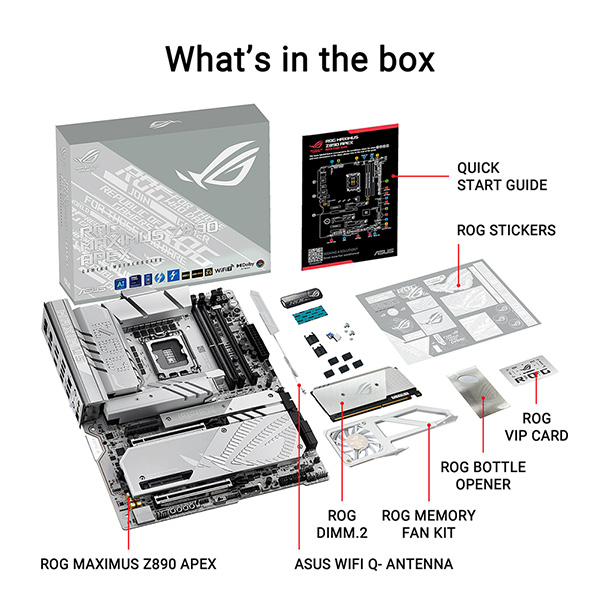
ROG DIMM.2 with Heatsink
1 x ROG DIMM.2 with heatsink
1 x M.2 pad for ROG DIMM.2
2 x M.2 screw package for ROG DIMM.2
Additional Cooling Kit
1 x Thermal pad for M.2 22110
1 x ROG Memory Fan Kit
Miscellaneous
1 x ASUS WiFi Q-Antenna
1 x Q-connector
1 x ROG VIP card
3 x M.2 Q-Slide package
5 x M.2 backplate rubber packages
1 x ROG Bottle Opener
Installation Media
1 x USB drive with utilities and drivers
Documentation
1 x Quick start guide
作業系統
Windows 11 (22H2 & later)
主機板尺寸
ATX Form Factor
12 inch x 9.6 inch ( 30.5 cm x 24.4 cm )
保用/保養條款
ASUS產品保用資訊
保用期(以官方網站/代理爲準)
電腦設備類(匯科系統有限公司 代理)
- 滑鼠 - 2 年保用
- 鍵盤 - 2 年保用
- 耳機 - 2 年保用
- 控制器 - 2 年保用
- 麥克風 - 2 年保用
- 攝影機 - 2 年保用
- ASUS X GUNDAM系列 - 1 年保用
- ASUS X EVA 系列 - 1 年保用
- TUF Gaming X MIKU 系列 - 1 年保用
網絡設備類(匯科系統有限公司 代理)
- 無線路由器 - 3年保用
- 無線網絡 USB 接收器 - 3年保用
外置儲存類(匯科系統有限公司 代理)
- ESD-T1U10 - 5年保用
- ESD-T1U20 - 5年保用
電腦硬件類(以包裝盒上代理貼紙爲準)
- 顯示卡 - 3年保用
- 主機板 - 3年保用
- 散熱類產品 - 2-6年保用
- ROG STRIX/RYUO系列 - 6年保用
- TUF Gaming 系列 - 6年保用
- ProArt系列 - 6年保用
- Prime 系列 - 2年保用
- 桌上型/一體式主機 - 1 年保用
- 迷你主機 - 4 年保用(需自行登記https://www.asus.com/hk/events/infoM/activity_miniPC_warranty)
- 筆記本電腦 - 2 年保用
- ALLY X - 2 年保用(國際)
顯示器類(以包裝盒上代理貼紙爲準)
- 指定型號網上登記後可升級至4年保用,詳見https://www.asus.com/hk/events/infoM/activity_lcd_warranty_
- 其餘型號 - 3年保用
保用申請流程
1. 華碩皇家俱樂部
- 華碩提供產品售後保養服務,保養期將根據列印在銷售單據上的日子起計。
- 閣下須保留銷售單據,以獲得保養服務。
- 華碩皇家俱樂部
- 地址:九龍長沙灣道650號中國船舶大廈1606室
- 電話:(852)3582 4770
- 辦公時間: 星期一至六: 10:00 - 19:00
- 星期日及公眾假期:休息
- 若服務時間有所異動,以服務中心公告為準
- 請注意 : 在進行任何系統還原或送修前,請務必備份您的資料。
2. 匯科系統有限公司 Basco Technology Limited
- 香港維修中心 - 匯科系統有限公司 Basco Technology Limited
- 地址:葵涌大連排道 35-41 號 金基工業大廈 21 樓 A 室
- 客戶服務熱線:(852) 3173-6080
- 客戶服務時間:星期一至五 10AM - 5PM;星期六 10AM - 12PM
1. 購物條款
- 1.1. 本政策適用於在2000Fun網上商城及門市 (openshop.com.hk) 購買的所有商品,包括但不限於實體商品、數位代碼(遊戲點數、序號)、預購商品等;
- 1.2. 我們不會對未完成付款的訂單保留產品庫存;
- 1.3. 產品內容及圖片以官方提供為準,2000Fun網站內產品內容/ 圖片僅供參考,如有更改將不另行通知;
- 1.4. 產品出售後如官方對其內容有更改,請向官方查詢,本店恕不負責;
- 1.5. 充值到2000Fun會員帳戶內的金額及帳戶內的餘額不可退回現金,但可使用於本站購物;
- 1.6. 2000Fun會員帳戶的紅利積分一經使用不設退換;
- 1.7. 產品保用條款說明請查閱:https://www.openshop.com.hk/channel_15.html
- 1.8. 請妥善保管收據,如客人需要索取遺失或損毀的購買收據,我們將收取50元之行政處理費用。此費用涵蓋資料核對、系統查詢及文件列印之成本;
- 1.9. 2000Fun客服專線WhatsApp: +852 64335478。
2. 各類商品特殊說明
數位代碼商品 (遊戲點數、軟體序號、DLC等):
- 2.1. 一旦訂單付款成功並經系統確認,我們將立即自動發送相關數位代碼;
- 2.2. 為防止詐騙與保障版權,數位代碼商品一經發送,概不提供任何訂單修改、取消、退款或換貨服務。請在下單前務必仔細確認所購買的遊戲平台、區域及產品內容;
- 2.3. 數位產品一律以電子形式發放,用戶可在2000Fun會員中心中查得訂單發貨情況;
- 2.4. 如產品出現任何問題(包括卡號錯誤),請於發貨日起計3天內向2000Fun客服回報,逾期將不受理。
預購商品:
- 2.5. 一經預購,不設退款;
- 2.6. 2000Fun網上商城及門市之未發售、未上市產品為「暫定預估價」,待到貨公司計算建議售價後,買家需配合修改結帳金額。若買家無法接受售價,可配合取消訂單、退還訂金;
- 2.7. 預購特典、到貨數量依代理公告及實際到貨為準,若遇數量短缺,將以已付款訂單的優先次序順序發貨;
- 2.8. 本公司保留訂單、出貨之權利;
- 2.9. 產品的到貨日期依照相關代理運送到達本公司時間為準。
特價促銷商品:
- 2.10. 部分特殊促銷商品(如限時閃購、限量特價品)有機會不接受取消、退款,保養條件亦會有不同,此類限制將在商品頁面明確標示。
3. 訂單狀態與可操作範圍
- 3.1. 訂單一經成立,即進入我們的系統處理流程。能否修改或取消,取決於訂單的當前狀態;
- 3.2. 所有修改、取消或退款請求,均需聯絡2000Fun客服渠道提出,我們不接受透過社交媒體留言或其他非正式渠道的處理請求。
為讓您更清晰理解,請參照以下流程圖判斷您的訂單狀態及可能選項:

4. 退款政策說明
重要提示:訂單一經付款確認後,如因客戶個人原因申請退款,我們將會收取額外行政費用(部份情況豁免,詳情如下)。
行政費豁免情況:
- 4.1. 在原定發貨日起超過7天都未能寄出商品(預購新產品除外);
- 4.2. 產品缺貨;
- 4.3. 請注意:新產品官方延期將無法獲得行政費用豁免(例如遊戲延期上市、因船期延誤延遲發貨)。
行政費收取標準:
- 適用於本地及海外訂單,因客戶個人原因(如「不想要了」)之退款。
- 4.4. 訂單總金額 $999 或以下:收取 $100 行政費;
- 4.5. 訂單總金額 $1000 - $2000:收取 $150 行政費;
- 4.6. 訂單總金額 $2001 - $4000:收取 $200 行政費;
- 4.7. 訂單總金額 $4001 或以上:收取 5% 行政費;
- 4.8. 低於 $50 的退款金額:只接受退回至2000Fun網上商城帳號餘額,恕不提供現金/ 銀行退款。
- 4.9. 如產品已發貨,除上述行政費外,客人需支付已發貨訂單的相應運輸費用(包括但不限於訂單寄出、召回等過程中產生的費用)
退款流程與注意事項:
- 4.10. 所有退款處理需時約 7-14個工作天(由2000Fun客服書面通知退款申請開始計算);
- 4.11. 請知悉:部份銀行、付款平台(如信用卡發卡行、支付寶等)將在處理退款時收取費用,此費用由用戶自行承擔,本公司恕不負責;
- 4.12. 退款金額為您實際支付的金額扣除4.10.費用、訂單退款行政費及訂單已產生的費用後的餘額。
退款申請所需資料:
- 如需申請退款,請聯絡2000Fun客服並提供以下資料:
- 4.13. 2000Fun網上商城訂單號碼
- 4.14. 購買日期
- 4.15. 訂單總額
- 4.16. 要求退款金額
-
4.17. 退款原因:
- 原因1-不能在預期內寄出商品(超過系統預計發貨時間7天)
- 原因2-產品缺貨
- 原因3-不想要這產品了(會收取行政費用)
5. 退貨與換貨(僅適用於實體商品)
- 5.1. 商品如有任何功能性問題(非人為損壞),請於簽收後7日內聯繫2000Fun客服申請換貨,保養條款請見 https://www.openshop.com.hk/channel_15.html
- 5.2. 若因個人原因(如誤購、不喜歡)要求退貨,恕不接受,您可透過2000Fun客服協商其他方案,最終會視乎訂單情況處理。
- 5.3. 退回的商品必須保持全新未開封、未經使用、所有配件及包裝完整。
- 5.4. 產品的外觀或外在包裝的輕微瑕疵不納入退/換貨範圍。如情況嚴重,請即聯絡客服。
本港地區
- 如果客戶的地址沒有升降機或難以到達的地方,可能將收取額外配送費用。
- 當八號或以上之颱風訊號懸掛或黑色暴雨警告生效時,送貨服務時間將會另作安排。
- 如送貨日為公眾假期,送貨安排有可能作出調動。
- 本地免費送遞範圍不包括偏遠地區、圍村、沒巴士到達地區、敏感地區(如政府機關,駐港解放軍營等)及郵政信箱等。 偏遠地區附加收費以各代理收費為準, 如沒有特別陳述則附加收費為 - 東涌、機場及馬灣等偏遠地區 HKD150 - 愉景灣 HKD250
- 本站之商品運費計算是取產品實際重量與材積重量兩者之間的較大值, 由於部份未推出的商品只是預計重量及尺寸,如重量/尺寸超出預算內而增加成本,客戶可能需要補回差額。
- 不同速遞公司對不同產品及地區有不同送貨條件, 即時客人選擇某一送貨方法, 我們亦可能根據實際情況幫客人選擇最佳送貨方案!
- 產品一經寄出後, 如有送貨資料需修改(包括地址/時間) 需由客人自行聯絡速遞公司。
- 每件商品標示的送貨日期為一般正常有庫存的情況,並非本站送貨承諾期, 若商品狀況為預購或購買多款產品,而商品分佈於不同門市,送貨日期可能會有所延長,實際送貨日期請向客服查詢!
- 本公司之商品配送服務時段為 星期一至六:上午10:00至晚上19:30,若您於訂單中指定之收件地址無法於此時段內完成收貨,建議您選擇其他適合的收件方式或時間。
- 若因客戶因素(如地址錯誤、收件人未回應)導致無法於時段內完成配送,將依本公司政策處理後續流程(例如:二次配送安排及收取額外費用)。
- 特殊節假日或天候因素可能影響配送時段,請以實際服務為準。
- 夜間/特殊時段附加費:若需於晚上19:30後配送,可能產生額外費用(香港島/九龍區$150, 新界區:$200), 最遲不可超過晚上10點
- 逾時等候費用:若因收件方原因(例如:無人應門、需要額外時間搬運私人物品、或地址/通道問題導致延誤等)超過15分鐘等候時間,我們將收取逾時等候費,計算方式如下: 收費標準: 每超過15分鐘(或不足15分鐘),將加收 HKD $50 等候費。
- 若送貨地址為無電梯或電梯無法運送之樓層,或因貨物體積過大必須行經樓梯,我們將按樓層高度收取樓梯搬運費,計算方式如下: 第3-10級收$300, 之後每10級收$200, 不足十級當十級計算, 如此類推。 如人力運輸路段需途經斜路,每50米加收$100。
- 免運費條款不適用贈品
- 寄件資料以客人提供的為準,若有任何因填寫錯漏而導致寄失或郵件退回的情況,本站恕不負責,客人需承擔風險,並可能需要為再次投寄而支付額外費用。故此客人填寫資料時,請核對並確認資料完整無誤
- 為保障您的權利開箱前請全程錄影,若商品有瑕疵缺件,請附上開箱影片供我們判斷與記錄。
- 本司商品在發貨時皆為最佳保護狀態, 若產品在運輸期間出現狀況, 例如碰撞導致貨品損毀等各種問題, 並不符合本司退換條款, 若客人擔心在運輸過程中發生任何意外, 可為商品額外購買保險,以保障客人權益。
- 所有送至門市或指定取貨點的待取商品(包括但不限於:贈品、禮品、維修件等),自到貨通知日(簡訊或電郵/ WhatsApp送達日)起,將享有 3天 的免費保管期,若商品超過上述3天免費保管期仍未領取,將自第4天起開始計收存倉管理費,每日收取$10。存倉費用以「每日每件」為計算單位,客人於取貨時需結清所有累積之存倉費用,方可領取商品。商品自到貨日起超過 30天 仍未被領取且未支付存倉費用,本公司將視該商品已被放棄,有權進行處理而不再另行通知,且已產生之費用仍需由客人負擔。
-
合併發貨原則:為簡化配送流程並節省您的運費, 單一訂單內若包含「現貨」與「預購」商品, 系統將自動設定為「貨物到齊後才統一寄出」。
申請拆單(先寄現貨):若您希望先收到部分現貨商品, 請於下單前分開結帳,或於下單後聯繫 [客服通道] 申請拆單。 拆單產生之額外運費(二次運費)須由買家自行負擔。
海外地區(非香港地區)
- 免運費產品不適用於非香港地區。
- 任何產品需寄送致海外地區請與客服查詢配送費用。
- 客戶需留意當地海關進口條例,如因海關扣查,沒收及/或追究,由客戶自行負責。
- 如因客戶要求寄貨有至當地而觸犯當地法例如引致民事及/或刑事責任,由客戶自行負責。
-
本公司對所有香港境外地區均適用貨交承運人(FCA, Free Carrier)政策,訂單包裹一經轉交承運方,本公司有權:
- 不對訂單提供任何形式售後支援。
- 不對訂單自交給承運方後所有潜在的損失或產生的附加費用負責。
- 不對訂單在寄遞過程有機會產生的稅務負責。
退貨注意事項
- 產品送出後如發現有損壞,需3天內向客服提出申請辦理退換。
- 如證實為可退換之產品,工作人員會盡快安排退換。
- 所有退換產品如需郵寄,郵費需由客戶支付(亦可於各門市分店交收)。
- 電腦遊戲產品一經開封,如壞碟換碟,壞盒換盒;序號不能作出任何退換。
- 虛擬產品不能作出任何退換。
