
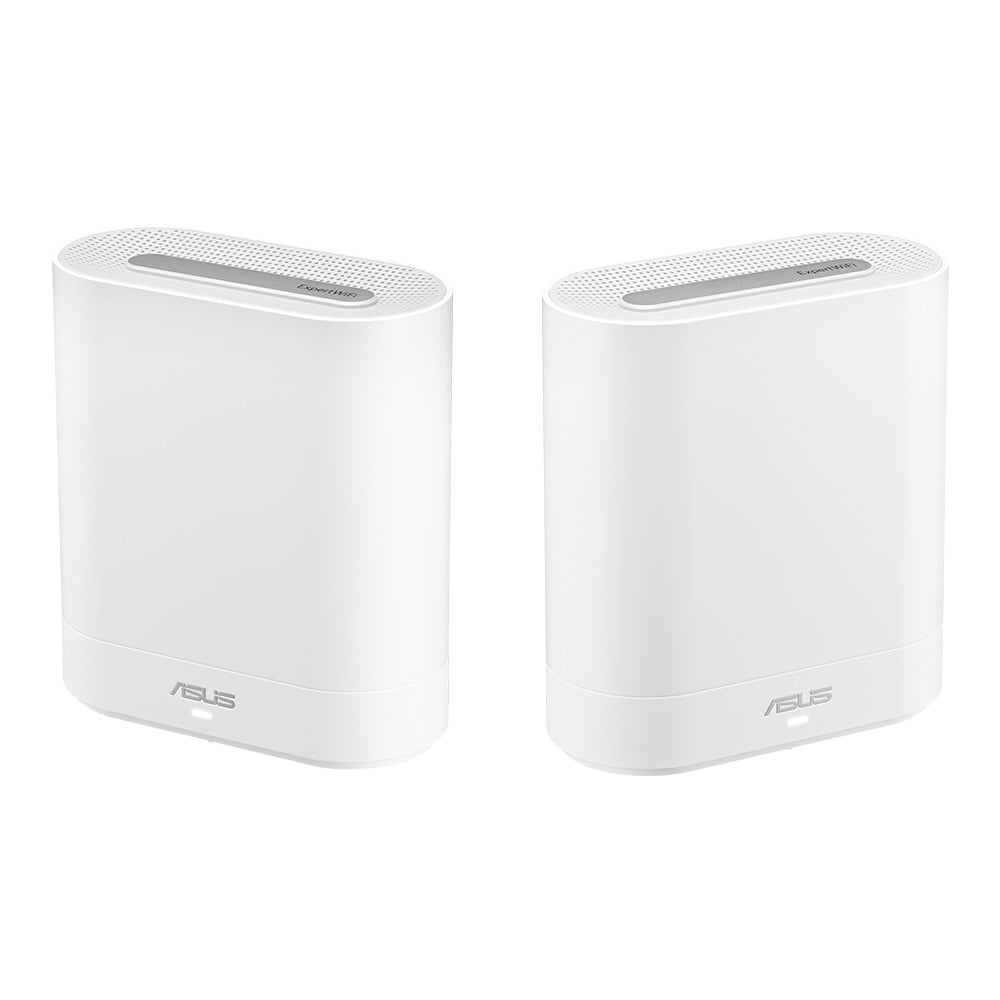
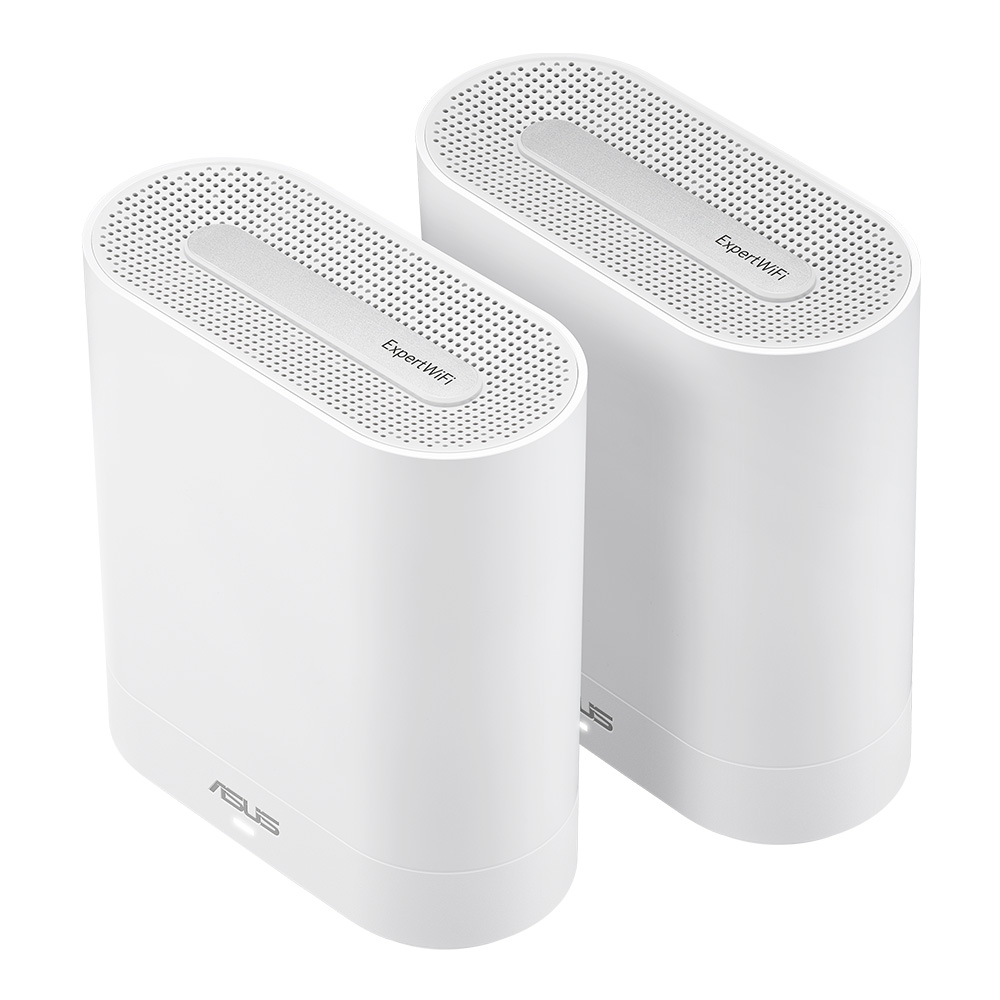
ASUS ExpertWiFi EBM68 Wireless-AX7800 Mesh Business Wifi 三頻路由器(WIFI 6)(白色-2 Pack)

 1090紅利)

 專享Autofull x Chiikawa 額外-$150折扣,優惠碼:
產品特點
ASUS ExpertWiFi EBM68 Business Mesh System
Your Business WiFi Expert Within Reach
The ASUS ExpertWiFi EBM68 provides a fast, secure, and scalable network with rich features tailored for mid-sized businesses. Whether used independently or extended with other ASUS ExpertWiFi solutions, the ExpertWiFi EBM68 can easily adapt to your business network needs.
Speed up your business
The fastest business mesh routers on the market for downloading and smooth video calls.
Connect your business to the max
4X greater network capacity, which can lower latency when demand is high
Stable business operation
ExpertWiFi supports virtual local area network (VLAN) management. VLAN management enables an easy, fast and flexible way to segment the network wired and wirelessly. You can dedicate an Ethernet port that provides additional security for your business.
The EBM68 provides reliable and stable internet access for business owners. With the dual WAN failover solution, businesses can easily switch to a backup WAN connection to minimize downtime during a network interruption, ensuring their POS system remains operational. In addition, business owners can use their smartphone as a backup internet provider by plugging it into the router's USB port. No complicated setup is needed — just plug it in and use it.
Commercial-grade network security
Site-to-site VPNs are useful for companies that prioritize private, protected traffic. They are particularly helpful for organizations that have multiple locations spread out over great distances, such as chain stores and overseas branch offices. Using a site-to-site VPN can quickly help you build up your private network to connect all these places and to share information or resources between intranets from different locations.
ASUS AiProtection leverages powerful cybersecurity solutions and cloud data centers from Trend Micro ™ to shield your business and all connected devices from cyber threats — with no subscription fee!
Check your security level with one tap, instead of fiddling with complicated settings.
Easy wall-mounting
The ExpertWiFi EBM68 has built-in wall-mounting holes and a wall-mounting stand, making it easy to install right where it’s needed. By just flipping the stand, it can also act as a cable organizer.
Design that makes signal better
The ExpertWiFi EBM68 features a quad-core CPU to deliver full performance potential for all businesses. Its vertical housing holds a specially designed antenna and circuit board that optimizes WiFi signal strength and provides better airflow, improving thermal performance for reliable operation.
- Special designed vents for increased airflow
- Double heatsink for maximized heat dissipation
- 45° antennas ensure strong WiFi in multi-story locations
- Vertical housing with space between antennas and circuit board for minimal WiFi signal interference
Versatile connectivity
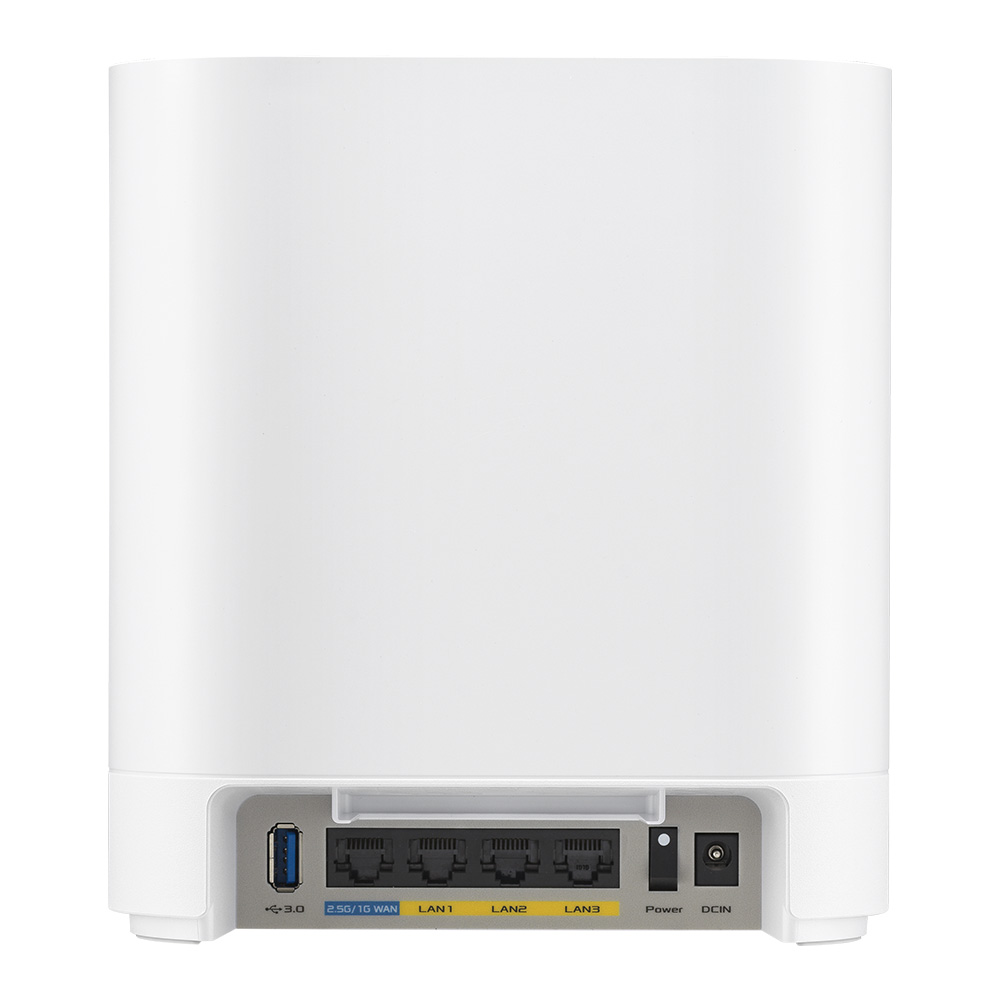
A 2.5 Gbps WAN port, a USB 3.2 Gen 1 port and three gigabit LAN ports with LAN aggregation* to suit your networking needs.
產品規格
型號
ASUS ExpertWiFi EBM68
Model Name
EBM68
Network Standard
IEEE 802.11a
IEEE 802.11b
IEEE 802.11g
WiFi 4 (802.11n)
WiFi 5 (802.11ac)
WiFi 6 (802.11ax)
IPv4
IPv6
Product Segment
AX7800 ultimate AX performance : 574+2402+4804Mbps
Data Rate
802.11a : up to 54 Mbps
802.11b : up to 11 Mbps
802.11g : up to 54 Mbps
WiFi 4 (802.11n) : up to 300 Mbps
WiFi 5 (802.11ac) (1024QAM): up to 4333Mbps
WiFi 6 (802.11ax) (2.4GHz) : up to 574 Mbps
WiFi 6 (802.11ax) (5GHz-1) : up to 2402Mbps
WiFi 6 (802.11ax) (5GHz-2) : up to 4804Mbps
Antenna
Internal antenna x 6
Transmit / Receive
2.4GHz 2x2
5GHz-1 2x2
5GHz-2 4x4
Processor
1.7 GHz quad-core processor
Memory
256 MB Flash
1 GB RAM
Boosts Speed
OFDMA (Orthogonal Frequency Division Multiple Access)
Beamforming: standard-based and universal
1024-QAM high data rate
20/40/80/160 MHz bandwidth
* The 160MHz bandwidth may be unavailable in the 5GHz band in some regions / countries due to regulatory restrictions.
Operating Frequency
2.4 GHz
5 GHz-1
5 GHz-2
Operating Mode
Wireless Router Mode
AiMesh Node Mode
Access Point Mode
I/O Ports
RJ45 for 2.5G BaseT for WAN x 1
RJ45 for Gigabits BaseT for LAN x 3
USB 3.2 Gen 1 x 1
Buttons
WPS Button
Reset Button
Power Switch
LED Indicator
Power x 1
Power Supply
AC Input : 110V~240V(50~60Hz)
DC Output : 12 V with max. 3 A current
Mounting
Wall Mount
Package Content
ExpertWiFi EBM68
RJ-45 cable
Power adapter
Warranty card
Quick start guide
Wall-mount kit
Product Weight (g)
808g
Product Dimentions
167x77x186 mm
Remark
Content and color may vary in different regions and packages.
AiMesh
AiMesh
• Primary AiMesh Router
• AiMesh Node
Device Access Control
"Allow you to block access to unwanted websites and apps."
------------------------------------------------------
Web & Apps Filters
Time Scheduling
Reward
Safe Browsing
Customized Internet Schedule
• Maximum Device Access Control Profile :12
• Maximum Device Access Control Content Filter Rule :12
Dashboard
Dashboard
Self-Defined Network
"You can create additional networks for different purposes, these networks are separate from the main network domain, to provide enhanced security, and create comprehensive network environment with customized settings."
------------------------------------------------------------------------
Self-Defined Network Type
• Employee
• Guest Portal
• Guest Network
• Scheduled Network
• IoT Network
• VPN Network
• Maximum Self-Defined Network Rule :16
VLAN
Captive Portal for Free WiFi
VPN WiFi
WiFi Scheduling: One Time Access
WiFi Scheduling: Weekly Schedule
WiFi share: QR code, PDF file
Bandwidth Limiter
AP isolate
DNS Server Connection
Security
AiProtection
VPN
WPA/WPA2/WPA3-Personal, WPA/WPA2-Enterprise
WPS
Let's Encrypt
DNS-over-TLS
SSH
Firewall
• Maximum Firewall Keyword Filter :64
• Maximum Firewall Network Service Filter :32
• Maximum Firewall URL Filter : 64
AiProtection
AiProtection Pro
• Router Security Assessment
• Malicious Site Blocking
• Two-Way IPS
• Infected Device Prevention and Blocking
VPN
VPN Client L2PT
VPN Client Open VPN
VPN Client PPTP
VPN Client WireGuard
VPN Server IPSec
VPN Server Open VPN
VPN Server PPTP
VPN Server WireGuard
VPN Fusion
Support Surfshark
Traffic Control
Adaptive QoS
• Bandwidth Monitor
• Bandwidth Limiter
Traffic Monitor
• Real-time Traffic Monitor
• Wired Traffic Monitor
• Wireless Traffic Monitor
Traffic Analyzer
• Website History
WAN
Internet Connection Type
• PPPoE
• PPTP
• L2TP
• Automatic IP
• Static IP
• IPSec
Dual WAN
3G / 4G LTE Dongle
4G / 5G Auto Mobile Tethering
Port Forwarding
Port Triggering
DMZ
DDNS
NAT Passthrough
• PPTP Pass-Through
• L2TP Pass-Through
• IPSec Pass-Through
LAN
DHCP Server
IGMP Snooping
IPTV
LAN Link Aggregation
VLAN
Wireless
UTF-8 SSID
WiFi MAC Address Filter
• Maximum MAC Filters : 64
Wireless Scheduler
USB application
4G / 5G Auto Mobile Tethering
Media Server
Samba Server
FTP Server
Shared Folder Privileges
User Interface
WEB: ASUSWRT
APP: ASUS ExpertWiFi APP
Management
Multiple Site Management
Administration
Configuration Backup and Restore
Diagnosis Tools
Feedback System
System Log
New Device Connect Notification
Login Captcha
Connection Diagnosis
Auto Firmware Update
相關網站
保用/保養條款
ASUS產品保用資訊
保用期(以官方網站/代理爲準)
電腦設備類(匯科系統有限公司 代理)
- 滑鼠 - 2 年保用
- 鍵盤 - 2 年保用
- 耳機 - 2 年保用
- 控制器 - 2 年保用
- 麥克風 - 2 年保用
- 攝影機 - 2 年保用
- ASUS X GUNDAM系列 - 1 年保用
- ASUS X EVA 系列 - 1 年保用
- TUF Gaming X MIKU 系列 - 1 年保用
網絡設備類(匯科系統有限公司 代理)
- 無線路由器 - 3年保用
- 無線網絡 USB 接收器 - 3年保用
外置儲存類(匯科系統有限公司 代理)
- ESD-T1U10 - 5年保用
- ESD-T1U20 - 5年保用
電腦硬件類(以包裝盒上代理貼紙爲準)
- 顯示卡 - 3年保用
- 主機板 - 3年保用
- 散熱類產品 - 2-6年保用
- ROG STRIX/RYUO系列 - 6年保用
- TUF Gaming 系列 - 6年保用
- ProArt系列 - 6年保用
- Prime 系列 - 2年保用
- 桌上型/一體式主機 - 1 年保用
- 迷你主機 - 4 年保用(需自行登記https://www.asus.com/hk/events/infoM/activity_miniPC_warranty)
- 筆記本電腦 - 2 年保用
- ALLY X - 2 年保用(國際)
顯示器類(以包裝盒上代理貼紙爲準)
- 指定型號網上登記後可升級至4年保用,詳見https://www.asus.com/hk/events/infoM/activity_lcd_warranty_
- 其餘型號 - 3年保用
保用申請流程
1. 華碩皇家俱樂部
- 華碩提供產品售後保養服務,保養期將根據列印在銷售單據上的日子起計。
- 閣下須保留銷售單據,以獲得保養服務。
- 華碩皇家俱樂部
- 地址:九龍長沙灣道650號中國船舶大廈1606室
- 電話:(852)3582 4770
- 辦公時間: 星期一至六: 10:00 - 19:00
- 星期日及公眾假期:休息
- 若服務時間有所異動,以服務中心公告為準
- 請注意 : 在進行任何系統還原或送修前,請務必備份您的資料。
2. 匯科系統有限公司 Basco Technology Limited
- 香港維修中心 - 匯科系統有限公司 Basco Technology Limited
- 地址:葵涌大連排道 35-41 號 金基工業大廈 21 樓 A 室
- 客戶服務熱線:(852) 3173-6080
- 客戶服務時間:星期一至五 10AM - 5PM;星期六 10AM - 12PM
1. 購物條款
- 1.1. 本政策適用於在2000Fun網上商城及門市 (openshop.com.hk) 購買的所有商品,包括但不限於實體商品、數位代碼(遊戲點數、序號)、預購商品等;
- 1.2. 我們不會對未完成付款的訂單保留產品庫存;
- 1.3. 產品內容及圖片以官方提供為準,2000Fun網站內產品內容/ 圖片僅供參考,如有更改將不另行通知;
- 1.4. 產品出售後如官方對其內容有更改,請向官方查詢,本店恕不負責;
- 1.5. 充值到2000Fun會員帳戶內的金額及帳戶內的餘額不可退回現金,但可使用於本站購物;
- 1.6. 2000Fun會員帳戶的紅利積分一經使用不設退換;
- 1.7. 產品保用條款說明請查閱:https://www.openshop.com.hk/channel_15.html
- 1.8. 請妥善保管收據,如客人需要索取遺失或損毀的購買收據,我們將收取50元之行政處理費用。此費用涵蓋資料核對、系統查詢及文件列印之成本;
- 1.9. 2000Fun客服專線WhatsApp: +852 64335478。
2. 各類商品特殊說明
數位代碼商品 (遊戲點數、軟體序號、DLC等):
- 2.1. 一旦訂單付款成功並經系統確認,我們將立即自動發送相關數位代碼;
- 2.2. 為防止詐騙與保障版權,數位代碼商品一經發送,概不提供任何訂單修改、取消、退款或換貨服務。請在下單前務必仔細確認所購買的遊戲平台、區域及產品內容;
- 2.3. 數位產品一律以電子形式發放,用戶可在2000Fun會員中心中查得訂單發貨情況;
- 2.4. 如產品出現任何問題(包括卡號錯誤),請於發貨日起計3天內向2000Fun客服回報,逾期將不受理。
預購商品:
- 2.5. 一經預購,不設退款;
- 2.6. 2000Fun網上商城及門市之未發售、未上市產品為「暫定預估價」,待到貨公司計算建議售價後,買家需配合修改結帳金額。若買家無法接受售價,可配合取消訂單、退還訂金;
- 2.7. 預購特典、到貨數量依代理公告及實際到貨為準,若遇數量短缺,將以已付款訂單的優先次序順序發貨;
- 2.8. 本公司保留訂單、出貨之權利;
- 2.9. 產品的到貨日期依照相關代理運送到達本公司時間為準。
特價促銷商品:
- 2.10. 部分特殊促銷商品(如限時閃購、限量特價品)有機會不接受取消、退款,保養條件亦會有不同,此類限制將在商品頁面明確標示。
3. 訂單狀態與可操作範圍
- 3.1. 訂單一經成立,即進入我們的系統處理流程。能否修改或取消,取決於訂單的當前狀態;
- 3.2. 所有修改、取消或退款請求,均需聯絡2000Fun客服渠道提出,我們不接受透過社交媒體留言或其他非正式渠道的處理請求。
為讓您更清晰理解,請參照以下流程圖判斷您的訂單狀態及可能選項:
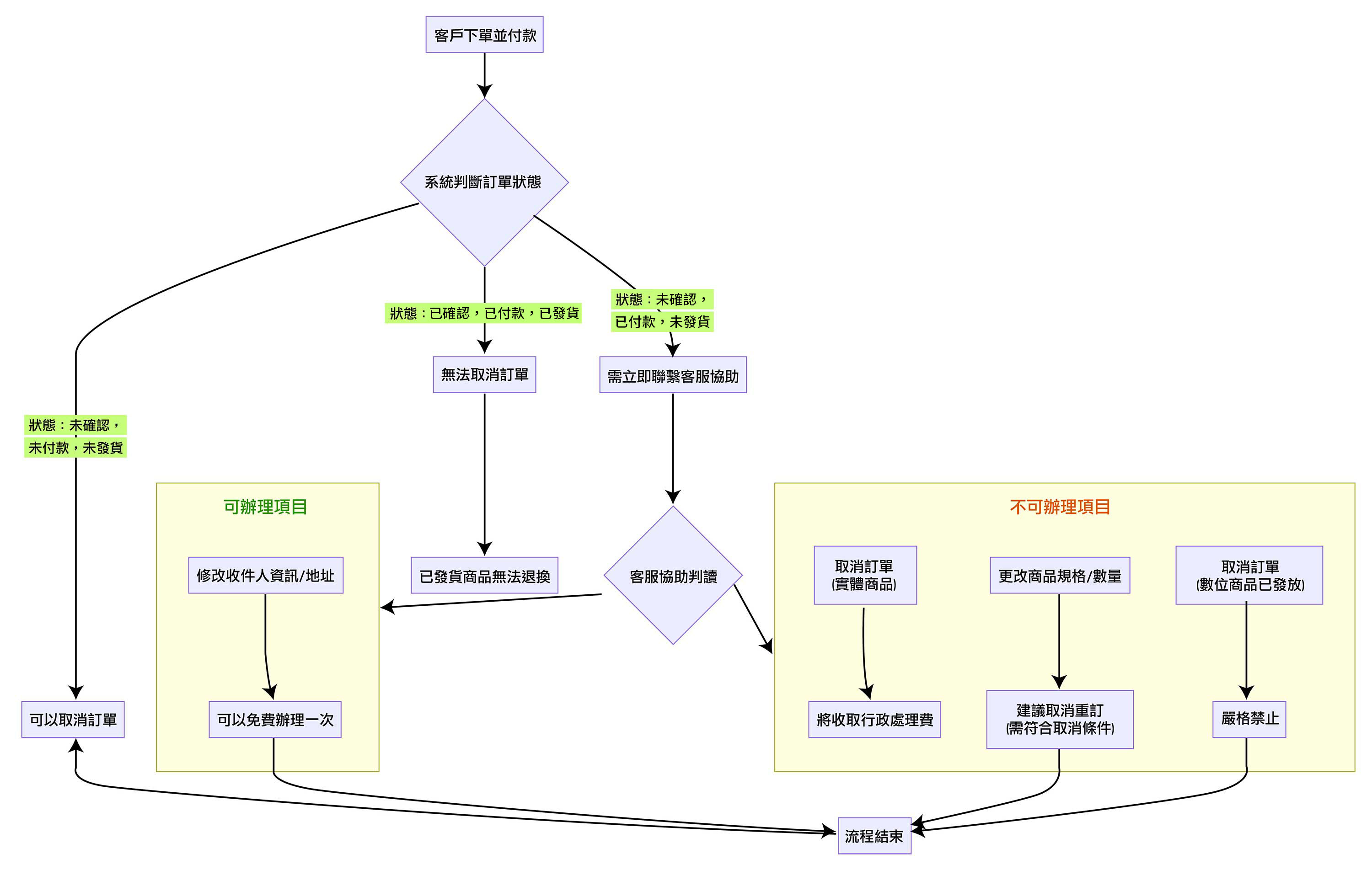
- 3.3. 訂單狀態詳細說明
已下單: 訂單已成功建立!請於 24 小時內完成付款以保留商品。
已付款: 已完成支付(如信用卡、轉帳匯款、電子支付等),且已收到款項。
已確認: 訂單已確認,即將進入備貨流程,進入此階段後無法修改訂單內容。
處理中: 倉庫人員正在進行列印揀貨單、從貨架上拿取商品、包裝封箱、貼上物流標籤等出貨前置作業,此時訂單通常會提供一個「物流追蹤編號」,方便客人在產品發出後查詢運送進度。
已發貨: 貨物已經完成包裝,等待物流公司收集, 客人可於稍後時間經物流公司網頁查詢運送進度。
4. 退款政策說明
重要提示:訂單一經付款確認後,如因客戶個人原因申請退款,我們將會收取額外行政費用(部份情況豁免,詳情如下)。
行政費豁免情況:
- 4.1. 在原定發貨日起超過7天都未能寄出商品(預購新產品除外);
- 4.2. 產品缺貨;
- 4.3. 請注意:新產品官方延期將無法獲得行政費用豁免(例如遊戲延期上市、因船期延誤延遲發貨)。
行政費收取標準:
- 適用於本地及海外訂單,因客戶個人原因(如「不想要了」)之退款。
- 4.4. 訂單總金額 $999 或以下:收取 $100 行政費;
- 4.5. 訂單總金額 $1000 - $2000:收取 $150 行政費;
- 4.6. 訂單總金額 $2001 - $4000:收取 $200 行政費;
- 4.7. 訂單總金額 $4001 或以上:收取 5% 行政費;
- 4.8. 低於 $50 的退款金額:只接受退回至2000Fun網上商城帳號餘額,恕不提供現金/ 銀行退款。
- 4.9. 如產品已發貨,除上述行政費外,客人需支付已發貨訂單的相應運輸費用(包括但不限於訂單寄出、召回等過程中產生的費用)
退款流程與注意事項:
- 4.10. 所有退款處理需時約 7-14個工作天(由2000Fun客服書面通知退款申請開始計算);
- 4.11. 請知悉:部份銀行、付款平台(如信用卡發卡行、支付寶等)將在處理退款時收取費用,此費用由用戶自行承擔,本公司恕不負責;
- 4.12. 退款金額為您實際支付的金額扣除4.10.費用、訂單退款行政費及訂單已產生的費用後的餘額。
退款申請所需資料:
- 如需申請退款,請聯絡2000Fun客服並提供以下資料:
- 4.13. 2000Fun網上商城訂單號碼
- 4.14. 購買日期
- 4.15. 訂單總額
- 4.16. 要求退款金額
-
4.17. 退款原因:
- 原因1-不能在預期內寄出商品(超過系統預計發貨時間7天)
- 原因2-產品缺貨
- 原因3-不想要這產品了(會收取行政費用)
5. 退貨與換貨(僅適用於實體商品)
- 5.1. 商品如有任何功能性問題(非人為損壞),請於簽收後7日內聯繫2000Fun客服申請換貨,保養條款請見 https://www.openshop.com.hk/channel_15.html
- 5.2. 若因個人原因(如誤購、不喜歡)要求退貨,恕不接受,您可透過2000Fun客服協商其他方案,最終會視乎訂單情況處理。
- 5.3. 退回的商品必須保持全新未開封、未經使用、所有配件及包裝完整。
- 5.4. 產品的外觀或外在包裝的輕微瑕疵不納入退/換貨範圍。如情況嚴重,請即聯絡客服。
本港地區
- 如果客戶的地址沒有升降機或難以到達的地方,可能將收取額外配送費用。
- 當八號或以上之颱風訊號懸掛或黑色暴雨警告生效時,送貨服務時間將會另作安排。
- 如送貨日為公眾假期,送貨安排有可能作出調動。
- 本地免費送遞範圍不包括偏遠地區、圍村、沒巴士到達地區、敏感地區(如政府機關,駐港解放軍營等)及郵政信箱等。 偏遠地區附加收費以各代理收費為準, 如沒有特別陳述則附加收費為 - 東涌、機場及馬灣等偏遠地區 HKD150 - 愉景灣 HKD250
- 本站之商品運費計算是取產品實際重量與材積重量兩者之間的較大值, 由於部份未推出的商品只是預計重量及尺寸,如重量/尺寸超出預算內而增加成本,客戶可能需要補回差額。
- 不同速遞公司對不同產品及地區有不同送貨條件, 即時客人選擇某一送貨方法, 我們亦可能根據實際情況幫客人選擇最佳送貨方案!
- 產品一經寄出後, 如有送貨資料需修改(包括地址/時間) 需由客人自行聯絡速遞公司。
- 每件商品標示的送貨日期為一般正常有庫存的情況,並非本站送貨承諾期, 若商品狀況為預購或購買多款產品,而商品分佈於不同門市,送貨日期可能會有所延長,實際送貨日期請向客服查詢!
- 本公司之商品配送服務時段為 星期一至六:上午10:00至晚上19:30,若您於訂單中指定之收件地址無法於此時段內完成收貨,建議您選擇其他適合的收件方式或時間。
- 若因客戶因素(如地址錯誤、收件人未回應)導致無法於時段內完成配送,將依本公司政策處理後續流程(例如:二次配送安排及收取額外費用)。
- 特殊節假日或天候因素可能影響配送時段,請以實際服務為準。
- 夜間/特殊時段附加費:若需於晚上19:30後配送,可能產生額外費用(香港島/九龍區$150, 新界區:$200), 最遲不可超過晚上10點
- 逾時等候費用:若因收件方原因(例如:無人應門、需要額外時間搬運私人物品、或地址/通道問題導致延誤等)超過15分鐘等候時間,我們將收取逾時等候費,計算方式如下: 收費標準: 每超過15分鐘(或不足15分鐘),將加收 HKD $50 等候費。
- 若送貨地址為無電梯或電梯無法運送之樓層,或因貨物體積過大必須行經樓梯,我們將按樓層高度收取樓梯搬運費,計算方式如下: 第3-10級收$300, 之後每10級收$200, 不足十級當十級計算, 如此類推。 如人力運輸路段需途經斜路,每50米加收$100。
- 免運費條款不適用贈品
- 寄件資料以客人提供的為準,若有任何因填寫錯漏而導致寄失或郵件退回的情況,本站恕不負責,客人需承擔風險,並可能需要為再次投寄而支付額外費用。故此客人填寫資料時,請核對並確認資料完整無誤
- 為保障您的權利開箱前請全程錄影,若商品有瑕疵缺件,請附上開箱影片供我們判斷與記錄。
- 本司商品在發貨時皆為最佳保護狀態, 若產品在運輸期間出現狀況, 例如碰撞導致貨品損毀等各種問題, 並不符合本司退換條款, 若客人擔心在運輸過程中發生任何意外, 可為商品額外購買保險,以保障客人權益。
- 所有送至門市或指定取貨點的待取商品(包括但不限於:贈品、禮品、維修件等),自到貨通知日(簡訊或電郵/ WhatsApp送達日)起,將享有 3天 的免費保管期,若商品超過上述3天免費保管期仍未領取,將自第4天起開始計收存倉管理費,每日收取$10。存倉費用以「每日每件」為計算單位,客人於取貨時需結清所有累積之存倉費用,方可領取商品。商品自到貨日起超過 30天 仍未被領取且未支付存倉費用,本公司將視該商品已被放棄,有權進行處理而不再另行通知,且已產生之費用仍需由客人負擔。
-
合併發貨原則:為簡化配送流程並節省您的運費, 單一訂單內若包含「現貨」與「預購」商品, 系統將自動設定為「貨物到齊後才統一寄出」。
申請拆單(先寄現貨):若您希望先收到部分現貨商品, 請於下單前分開結帳,或於下單後聯繫 [客服通道] 申請拆單。 拆單產生之額外運費(二次運費)須由買家自行負擔。
海外地區(非香港地區)
- 免運費產品不適用於非香港地區。
- 任何產品需寄送致海外地區請與客服查詢配送費用。
- 客戶需留意當地海關進口條例,如因海關扣查,沒收及/或追究,由客戶自行負責。
- 如因客戶要求寄貨有至當地而觸犯當地法例如引致民事及/或刑事責任,由客戶自行負責。
-
本公司對所有香港境外地區均適用貨交承運人(FCA, Free Carrier)政策,訂單包裹一經轉交承運方,本公司有權:
- 不對訂單提供任何形式售後支援。
- 不對訂單自交給承運方後所有潜在的損失或產生的附加費用負責。
- 不對訂單在寄遞過程有機會產生的稅務負責。
退貨注意事項
- 產品送出後如發現有損壞,需3天內向客服提出申請辦理退換。
- 如證實為可退換之產品,工作人員會盡快安排退換。
- 所有退換產品如需郵寄,郵費需由客戶支付(亦可於各門市分店交收)。
- 電腦遊戲產品一經開封,如壞碟換碟,壞盒換盒;序號不能作出任何退換。
- 虛擬產品不能作出任何退換。
